
CodeBurn — See Where Your AI Coding Tokens Go: Full Installation Guide
CodeBurn — See Where Your AI Coding Tokens Go: Full Installation Guide
What is CodeBurn?
CodeBurn is an open-source TUI dashboard that tracks token usage, cost, and performance across 20 AI coding tools — including Claude Code, Codex, Cursor, Gemini CLI, Copilot, Cline, and more. It reads session data directly from disk, prices every API call using LiteLLM, and shows you exactly where your budget goes.
GitHub: github.com/getagentseal/codeburn
Website: codeburn.app
License: MIT
Stars: ⭐ 6,800+ (launched April 2026, rapidly growing)
Why this matters: If you use Claude Code, Codex, or any AI coding assistant daily, your token spend can quietly add up to hundreds of dollars a month. CodeBurn gives you the same cost observability you'd expect from cloud billing dashboards — but for local AI tooling, and without sending any data to a third party.
Key Capabilities
- Supported providers: Claude Code, Claude Desktop, Codex, Cursor, Cursor Agent, Gemini CLI, Copilot, Cline, Roo Code, KiloCode, OpenCode, OpenClaw, Pi/OMP, Mistral Vibe, Qwen, Kimi Code CLI, Warp, Goose, Antigravity, Droid, Kiro, IBM Bob, Crush — 20+ total
- Task classification: 13 deterministic categories (Coding, Debugging, Feature Dev, Refactoring, Testing, etc.) — no LLM calls
- One-shot rate: Percentage of edit turns that succeeded without retries
- Optimize mode: Scans your usage patterns and suggests concrete fixes to reduce waste
- Compare mode: Side-by-side model cost comparison
- Yield tracking: Measures productive vs. reverted/abandoned spend
- macOS menubar: Always-visible cost indicator with popover dashboard
- Works entirely locally: No proxy, no wrapper, no API keys, no data sent anywhere
Why is CodeBurn Trending?
CodeBurn hit 6,800+ GitHub stars in just over a month because it solves a very real problem: AI coding costs are invisible. When you run claude code or codex all day, the tokens flow silently. There's no dashboard, no breakdown, no easy way to answer questions like:
- "Why did my Claude bill jump from $50 to $200 this month?"
- "Which project is burning the most tokens?"
- "Am I overpaying by using Opus for simple tasks?"
- "What's my cache hit rate? Should I optimize my prompts?"
CodeBurn answers all of these in 30 seconds flat. The interactive TUI gives you per-project, per-model, per-task-type breakdowns with live auto-refresh. It's the missing billing dashboard for the AI coding era.
Prerequisites
- Node.js 20+ (or Bun/Deno as alternatives)
- At least one supported AI coding tool with session data on disk
- Linux, macOS, or Windows (Linux paths auto-detected)
Installation
CodeBurn installs via npm or Homebrew. Choose your preferred method:
Option 1: npm (global)
npm install -g codeburnOption 2: Homebrew (macOS)
brew tap getagentseal/codeburn
brew install codeburn
Option 3: Run directly (no install)
npx codeburn
# or
bunx codeburn
# or
dx codeburn
Verify the installation
codeburn --versionIf the version number appears, you're ready to go. CodeBurn auto-detects which AI coding tools you have session data for — no configuration file needed.
Usage
Interactive Dashboard
The default command opens the full interactive TUI dashboard:
codeburnIt shows the last 7 days by default. Use arrow keys to switch between Today, 7 Days, 30 Days, Month, and 6 Months. Press q to quit. The dashboard auto-refreshes every 30 seconds.
Quick Reports
codeburn today             # today's usage
codeburn month             # this month's usage
codeburn report -p 30days  # rolling 30-day window
codeburn report -p all     # every recorded session
codeburn status            # compact one-liner (today + month)
Filter by Date Range
codeburn report --from 2026-05-01 --to 2026-05-10Export Data
codeburn export            # CSV with today, 7 days, 30 days
codeburn export -f json    # JSON export
Optimization & Analysis
codeburn optimize          # find waste, get copy-paste fixes
codeburn compare           # side-by-side model comparison
codeburn yield             # productive vs reverted/abandoned spend
codeburn models            # per-model token + cost table
codeburn models --by-task  # explode each model into per-task rows
Filter by Provider
codeburn report --provider claude    # restrict to Claude Code
codeburn today --provider codex      # Codex only
codeburn export --provider cursor    # Cursor only
Architecture Overview
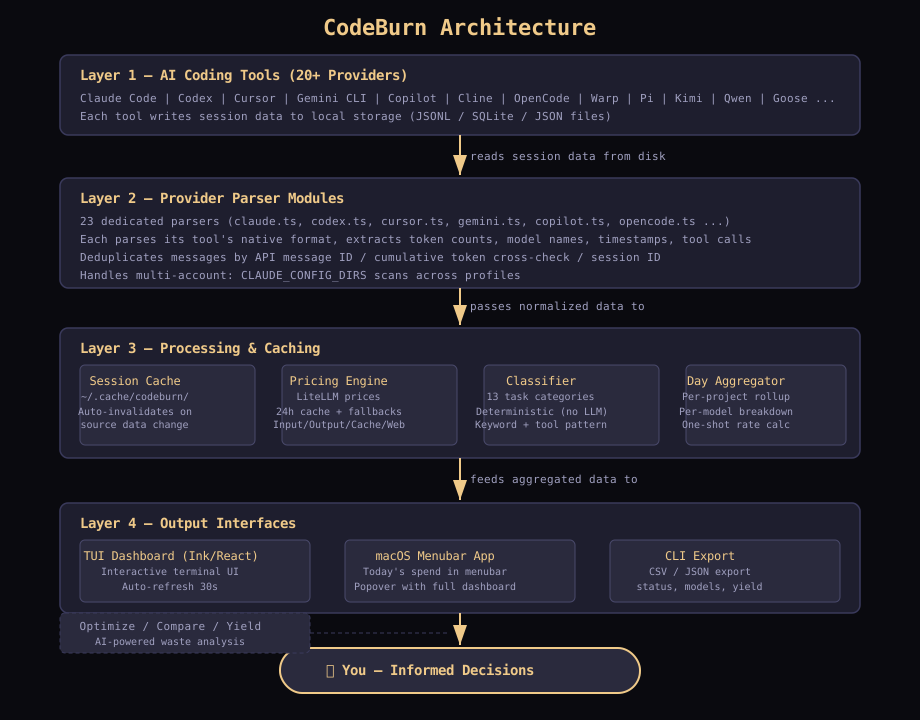
CodeBurn follows a provider-plugin architecture where each AI coding tool has a dedicated parser:
-
Data Layer — Each provider module reads session data from the tool's local storage (JSONL, SQLite, JSON files). For Claude Code it reads
~/.claude/projects/*.jsonl, for Cursor it reads SQLite fromstate.vscdb, for Codex it reads~/.codex/sessions/*.jsonl, and so on. -
Caching Layer — Parsed results are cached to disk (
~/.cache/codeburn/) to avoid re-parsing on every dashboard refresh. Caches auto-invalidate when source data changes. -
Pricing Engine — Uses LiteLLM pricing data (auto-cached 24h) with hardcoded fallbacks for all Claude and GPT models. Handles input, output, cache read, cache write, and web search costs.
-
Classification Engine — 13 task categories determined purely from tool usage patterns and keyword matching. No LLM calls, fully deterministic.
-
TUI Dashboard — Built with Ink (React for CLI) providing interactive terminal UI with auto-refresh, keyboard shortcuts, and multi-period views.
-
macOS Menubar — Native macOS app that shows today's spend in the menu bar with a full popover dashboard.
Reading the Dashboard
CodeBurn surfaces patterns worth watching:
| Signal | What it might mean |
|---|---|
| Cache hit < 80% | System prompt or context not stable, or caching not enabled |
| Lots of Read calls per session | Agent re-reading same files, missing context |
| Low 1-shot rate (Coding 30%) | Agent struggling with edits, retry loops |
| Opus 4.6 dominating cost on small turns | Overpowered model for simple tasks |
| Conversation category dominant | Agent talking instead of doing |
Bash dominated by git status, ls |
Agent exploring instead of executing |
Environment Variables
| Variable | Purpose |
|---|---|
CLAUDE_CONFIG_DIR |
Override Claude Code data directory (default: ~/.claude) |
CLAUDE_CONFIG_DIRS |
Multi-account Claude scan (colon-delimited paths) |
CODEX_HOME |
Override Codex data directory (default: ~/.codex) |
KIMI_SHARE_DIR |
Override Kimi Code CLI share directory |
QWEN_DATA_DIR |
Override Qwen data directory |
VIBE_HOME |
Override Mistral Vibe home directory |
WARP_DB_PATH |
Override Warp database path |
Verification Checklist
codeburnopens the interactive TUI dashboard- Dashboard shows token usage and cost breakdowns
- Arrow keys switch between Today / 7 Days / 30 Days / Month / 6 Months
codeburn statusshows a compact one-linercodeburn exportgenerates a CSV filecodeburn optimizescans for waste and suggests fixes
Resources
- GitHub: github.com/getagentseal/codeburn
- Website: codeburn.app
- npm: npmjs.com/package/codeburn
- LiteLLM Pricing: github.com/BerriAI/litellm
- Discord: discord.gg/pJ2DMWvtAx