
Graphify: Turn Any Codebase into a Queryable Knowledge Graph for Your AI Coding Assistant
Graphify: Turn Any Codebase into a Queryable Knowledge Graph for Your AI Coding Assistant
Type /graphify . in your AI coding assistant and it maps your entire project — code, docs, PDFs, images, and videos — into a knowledge graph you can query instead of grepping through files. It's like giving your AI assistant an internal GPS for your codebase.
What is Graphify?
Graphify is an open-source Claude Code skill (backed by a Python library) that turns any folder of code into a queryable knowledge graph. It works across 31 programming languages and supports docs, PDFs, images, and even video transcripts. Created by Safi Shamsi and backed by Y Combinator (S26), Graphify has exploded to 53,000+ GitHub stars in under two months.
The result is three files:
graph.html— an interactive visual graph you can open in any browserGRAPH_REPORT.md— highlights: key concepts, surprising connections, suggested questionsgraph.json— the full structured graph for programmatic queries
Once built, you can type /graphify query "what connects auth to the database?" instead of digging through files.
Why is it Trending?
Graphify hit the sweet spot of a massive, real pain point. AI coding assistants (Claude Code, Codex, Cursor, Gemini CLI) are powerful, but they struggle with large codebases — context windows fill up fast, and the assistant can't see the forest for the trees. Graphify solves this by building a persistent, queryable map that costs 71× fewer tokens to query than reading raw files.
Key drivers of its popularity:
- Works with 17+ AI coding platforms — Claude Code, Codex, Cursor, Gemini CLI, GitHub Copilot, Aider, OpenCode, OpenClaw, Hermes, Kimi Code, Kiro, Pi, and more
- 71.5× token reduction on real-world corpora (Karpathy repos + papers + images: 52 files)
- Privacy-first — code is analyzed locally via tree-sitter AST (no API calls for code). Only docs/PDFs/images use your assistant's model
- YC-backed — S26 batch, indicating real startup traction
- Zero-config — install once, type
/graphify .and get your graph
How it Works
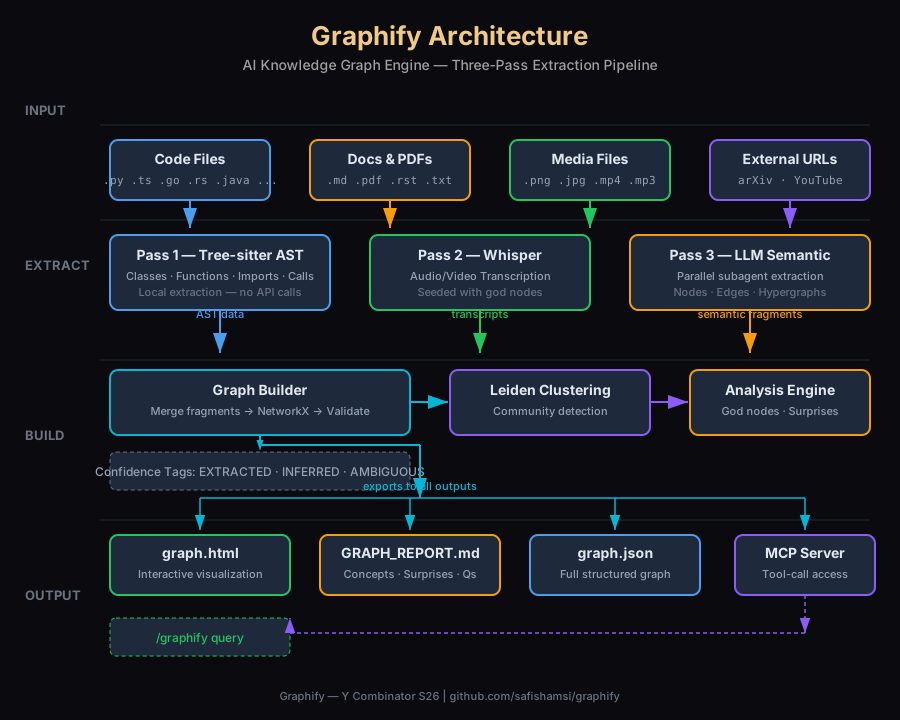
Graphify processes your files in three passes:
Pass 1 — Code Structure (Free, No API Calls)
Tree-sitter parses your code files and extracts classes, functions, imports, call graphs, and inline comments. This runs entirely locally. 31 languages are supported, plus SQL files get special treatment (tables, views, foreign keys, JOIN relationships).
Pass 2 — Video and Audio (Local, No API Calls)
Video and audio files are transcribed with faster-whisper locally. The transcription prompt is seeded with your top "god nodes" (most-connected concepts) to focus on domain relevance.
Pass 3 — Docs, Papers, Images (Uses AI Model)
Markdown, PDFs, images, and transcripts are sent to your AI assistant for semantic extraction. Multiple subagents run in parallel, each outputting a JSON fragment with nodes and edges. These fragments are merged into a single graph.
Community Detection
Graphify uses the Leiden algorithm — a graph-clustering method that groups nodes by edge density. No embeddings, no vector database needed. The semantic similarity edges that your AI model extracts are already in the graph, so they influence community shape directly.
Confidence Tagging
Every relationship is tagged:
EXTRACTED— found directly in source (e.g., function call, import)INFERRED— reasonable deduction with a confidence score (0.0–1.0)AMBIGUOUS— uncertain, flagged for manual review
Prerequisites
- Python 3.10+ —
python --versionto check - uv (recommended) or pipx for installation
- One of: Claude Code, Codex, Cursor, Gemini CLI, or any supported AI coding assistant
- For headless/CI extraction: an API key (Anthropic, Gemini, OpenAI, DeepSeek)
Installation & Setup
Step 1 — Install the Package
# Recommended — uv puts graphify on PATH automatically
uv tool install graphifyy

# Alternatives:
pipx install graphifyy
pip install graphifyy
Note: The PyPI package is
graphifyy(double-y). The CLI command is stillgraphify.
Step 2 — Register the Skill with Your AI Assistant
graphify installThat's it. Open your AI assistant and type /graphify . to build your first graph.
Step 3 — Platform-Specific Setup
Graphify supports all major platforms with dedicated install commands:
# Claude Code (Linux/Mac)
graphify install

# Codex (add multi_agent = true in config)
graphify install --platform codex

# VS Code Copilot Chat
graphify vscode install

# Cursor
graphify cursor install

# Gemini CLI
graphify install --platform gemini

# Hermes Agent
graphify install --platform hermes
Project-Scoped Install
To install the skill into a specific repository (so teammates get it automatically):
graphify install --project
graphify install --project --platform codex
This writes the skill file under .claude/skills/graphify/SKILL.md or .agents/skills/graphify/SKILL.md in your project directory — commit these files to share with your team.
Using Graphify
Build Your First Graph
# Map the current directory
/graphify .

# Map a specific folder
/graphify ./src

# Re-extract only changed files
/graphify ./src --update

# Skip HTML visualization (JSON + report only)
/graphify . --no-viz
Query the Graph
# Natural language queries
/graphify query "what connects auth to the database?"
/graphify query "show the login flow"

# Graph traversal
/graphify path "UserService" "DatabasePool"
/graphify explain "RateLimiter"

# Add external resources
/graphify add https://arxiv.org/abs/1706.03762
/graphify add <youtube-url>
Team Workflow
Graphify is designed for teams:
# Auto-rebuild on every git commit
graphify hook install

# Commit graphify-out/ to the repo so everyone starts with a map
# Recommended .gitignore additions:
#   graphify-out/manifest.json
#   graphify-out/cost.json
One person runs /graphify . and commits graphify-out/. Everyone pulls — their assistant reads the graph immediately. The git hook also sets up a merge driver that union-merges graph.json automatically when two devs commit in parallel.
Optional Extras
pip install "graphifyy[pdf]"      # PDF extraction
pip install "graphifyy[video]"    # Video/audio transcription
pip install "graphifyy[mcp]"      # MCP stdio server
pip install "graphifyy[all]"      # Everything
MCP Server Integration
Graphify can expose its graph as an MCP server for structured, tool-call access:
# Start the MCP server
python -m graphify.serve graphify-out/graph.json

# Register with Kimi Code
kimi mcp add --transport stdio graphify -- python -m graphify.serve graphify-out/graph.json
The MCP server provides: query_graph, get_node, get_neighbors, shortest_path, list_prs, get_pr_impact, triage_prs.
PR Dashboard
Graphify includes a built-in PR dashboard for team workflows:
graphify prs                    # General PR dashboard
graphify prs 42                 # Deep dive on PR #42
graphify prs --triage           # AI ranks your review queue
graphify prs --conflicts        # PRs sharing graph communities
Environment Variables (Headless/CI Extraction)
These are only needed for running graphify extract without an IDE:
| Variable | Purpose |
|---|---|
ANTHROPIC_API_KEY |
Claude backend |
GEMINI_API_KEY |
Gemini backend |
OPENAI_API_KEY |
OpenAI backend |
DEEPSEEK_API_KEY |
DeepSeek backend |
OLLAMA_BASE_URL |
Ollama local inference |
AWS_* / ~/.aws/credentials |
Bedrock (IAM-based, no API key) |
Verification Checklist
graphify --versionshows the installed version/graphify .completes without errorsgraphify-out/graph.htmlopens in browser showing an interactive graphgraphify-out/GRAPH_REPORT.mdcontains god nodes and connections/graphify query "show the architecture"returns meaningful resultsgraphify installadds the skill to your AI assistant- Running
graphify extract ./docs --backend geminiworks for headless extraction
Resources
- GitHub: github.com/safishamsi/graphify
- Website: graphifylabs.ai
- How it works: docs/how-it-works.md
- Architecture: ARCHITECTURE.md
- Author: Safi Shamsi on LinkedIn
- Book: The Memory Layer