
Stash — Persistent Memory for AI Agents
Stash — Persistent Memory for AI Agents
Every AI conversation starts from zero. You explain your project, your preferences, your context — and then next session, you explain it all over again. Its amnesia isn't a feature; it's a fundamental limitation of how LLMs work.
Stash solves this. It's a self-hosted, open-source persistent memory layer for AI agents. Think of it as a cognitive infrastructure — facts become relationships, relationships become patterns, patterns become wisdom. Stash runs as an MCP server with background consolidation, giving any MCP-compatible agent a knowledge graph, goals, causal reasoning, and a self-model that persists across sessions.
In this tutorial, you'll learn what Stash is, why it's trending, how its architecture works, and how to deploy it in minutes with Docker Compose.
Why Stash Is Trending
The AI agent ecosystem is exploding, but most agents have short-term memory at best. They operate within a single context window. Once that window closes, everything learned disappears.
Stash addresses this gap at the right time. The MCP (Model Context Protocol) standard has made it possible for agents to connect to external tools, and Stash provides the memory substrate that makes agents genuinely useful over time. With 700+ GitHub stars in its first month, Stash has resonated with developers building persistent agent systems, from coding assistants to personal AI companions.
Key reasons for its rapid adoption:
- Single binary in Go — no heavy dependencies, small footprint, easy to deploy
- MCP-native — works with any MCP-compatible agent (Claude Desktop, Cursor, Windsurf, Cline, Continue, OpenAI Agents)
- 8-stage consolidation pipeline — raw observations become structured knowledge automatically
- Self-hosted with Docker Compose — your data stays on your infrastructure
- Model-agnostic — works with OpenAI, OpenRouter, Ollama, or any OpenAI-compatible endpoint
Architecture Overview
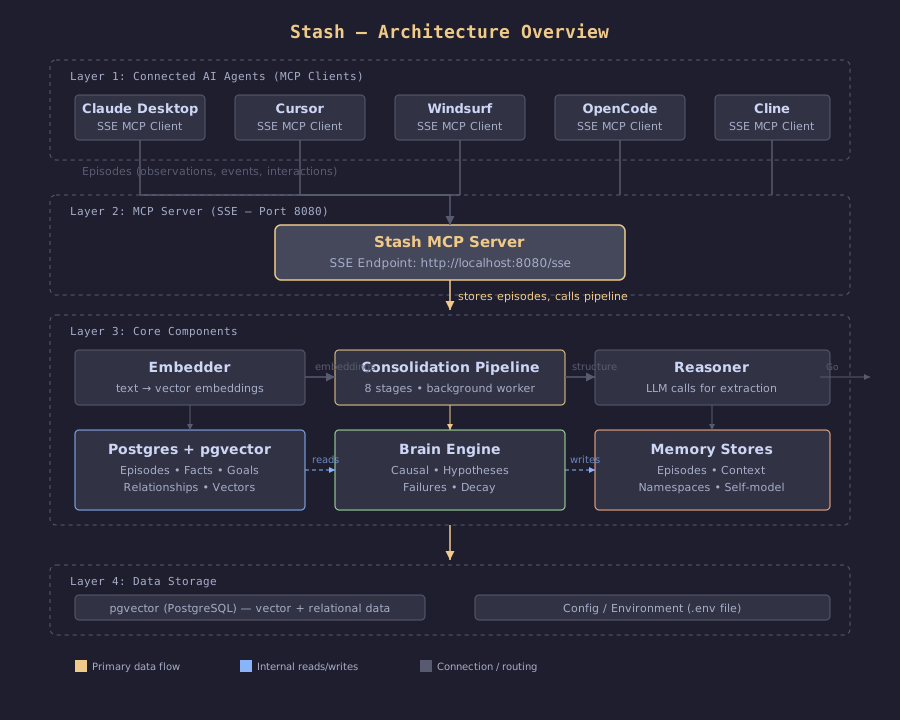
Stash uses a layered architecture with three main tiers:
1. MCP Server Layer — The SSE-based MCP server receives episodes (events, observations, interactions) from connected agents. It exposes a standard MCP interface that any MCP-compatible client can connect to.
2. Memory Stores — Postgres with pgvector stores vector embeddings of episodes, facts, goals, and relationships. The embedder layer converts text into vector representations using any OpenAI-compatible embedding model.
3. Consolidation Pipeline (Brain) — The background pipeline runs through 8 stages: context assembly, fact extraction, relationship modeling (causal, contradiction, hypothesis), goal tracking, failure pattern analysis, and confidence decay.
Prerequisites
Before you start, make sure you have:
- Docker and Docker Compose installed
- An OpenAI API key (or OpenRouter key with compatible models)
- MCP-compatible client (Claude Desktop, Cursor, Windsurf, etc.)
Setup and Configuration
Step 1: Clone and Configure
git clone https://github.com/alash3al/stash.git
cd stash
cp .env.example .env
Step 2: Edit Environment Variables
Open .env and set your API credentials:
# Database (Docker Compose handles this automatically)
STASH_POSTGRES_DSN=postgres://stash:stash_dev_password@postgres:5432/stash?sslmode=disable

# Vector dimension for text-embedding-3-small
STASH_VECTOR_DIM=1536

# OpenAI or compatible API
STASH_OPENAI_API_KEY=sk-your-api-key-here
STASH_OPENAI_BASE_URL=https://api.openai.com/v1
STASH_EMBEDDING_MODEL=text-embedding-3-small
STASH_REASONER_MODEL=gpt-4o-mini
If you prefer OpenRouter:
STASH_OPENAI_BASE_URL=https://openrouter.ai/api/v1
STASH_EMBEDDING_MODEL=openai/text-embedding-3-small
STASH_REASONER_MODEL=openai/gpt-4o-mini
Or with Ollama (local models):
STASH_OPENAI_BASE_URL=http://host.docker.internal:11434/v1
STASH_EMBEDDING_MODEL=nomic-embed-text
STASH_REASONER_MODEL=llama3.2
Step 3: Launch with Docker Compose
docker compose up -dThis starts two services:
- postgres — pgvector-enabled PostgreSQL for storage
- stash — The MCP server with background consolidation
Wait for both services to be healthy:
docker compose ps
# Both should show "healthy" status
Step 4: Connect Your Agent
Stash exposes an MCP server over SSE at http://localhost:8080/sse.
Claude Desktop — add to claude_desktop_config.json:
{
  "mcpServers": {
    "stash": {
      "url": "http://localhost:8080/sse"
    }
  }
}
Cursor — add to ~/.cursor/mcp.json:
{
  "mcpServers": {
    "stash": {
      "url": "http://localhost:8080/sse"
    }
  }
}
OpenCode — add to ~/.config/opencode/config.json:
{
  "mcp": {
    "stash": {
      "type": "remote",
      "url": "http://localhost:8080/sse",
      "enabled": true
    }
  }
}
Once connected, your agent immediately starts persisting episodes. Each conversation, observation, and interaction becomes a memory that future sessions can recall.
How It Works
Stash transforms raw interactions into structured knowledge through an 8-stage consolidation pipeline:
- Context Assembly — Groups related episodes into coherent context windows
- Fact Extraction — Identifies factual statements and stores them with confidence scores
- Relationship Mapping — Links facts to each other (causes, contradicts, supports)
- Goal Tracking — Extracts goals and tracks progress across sessions
- Causal Modeling — Builds cause-effect chains from observations
- Hypothesis Verification — Tests new observations against existing facts
- Failure Pattern Analysis — Identifies recurring failure modes
- Confidence Decay — Applies time-based decay to older memories
Each stage processes only new data since the last run, making the pipeline efficient for continuous operation.
Verification Checklist
After deployment, verify everything works:
- Stash MCP server is accessible:
curl -s http://localhost:8080/sseshould return a stream - Your agent shows Stash as a connected MCP tool
- After chatting, facts persist across sessions (restart and ask "what do you remember about me?")
- Check consolidation logs:
docker compose logs stash | grep consolidation - Postgres has data:
docker compose exec postgres psql -U stash -c "SELECT COUNT(*) FROM episodes;"
Resources
- GitHub: github.com/alash3al/stash
- Documentation: alash3al.github.io/stash
- License: Apache 2.0
- Author: Mohamed Al-Ashaal